
Conversation Flow
The assessment lifecycle end-to-end - phases, branching, step-back, and sequencing rules
This chapter describes the shape of a consultation from the client's point of view: which phases the user moves through, how you know what to render, when branches occur, and how the conversation ends.
The core loop
After onboarding, the entire conversation is one loop:
                ┌────────────────────────────────────────────┐
                ▼                                            │
   read response.question ──► render UI from type/messages/ │
   choices/constraints ──► user answers ──► POST /chat      │
   {type, included, excluded} ──► next response ────────────┘
                │
                └──► when conversation_details.report_possible == true
                     and no further question: GET /report
Three fields of conversation_details steer the client:
| Field | Meaning |
|---|---|
report_possible | The final report can now be generated (GET /report). |
step_back_possible | POST /step-back is currently allowed. |
conversation_ended | The conversation is over. Only the last state remains readable; a new login is required for a new assessment. |
Also present: scenario (an internal state label such as CONSULTATION_QUESTIONS — useful for logging/analytics, but do not build UI logic on specific values; the set can change), progress (for a progress bar), and symptoms_summary (running lists of selected / excluded / ignored symptoms, each {cui, name} — good for a persistent "your symptoms" side panel).
There are two ways a consultation can end in a report:
- Consultation report — generated at the end of a completed assessment; retrieved with a separate call to
GET /reportoncereport_possibleistrue. - Premature report — when the engine determines that no meaningful outcome can be reached with the available information, the report is returned immediately in the chat response's
reportfield (see edge-case outcomes).
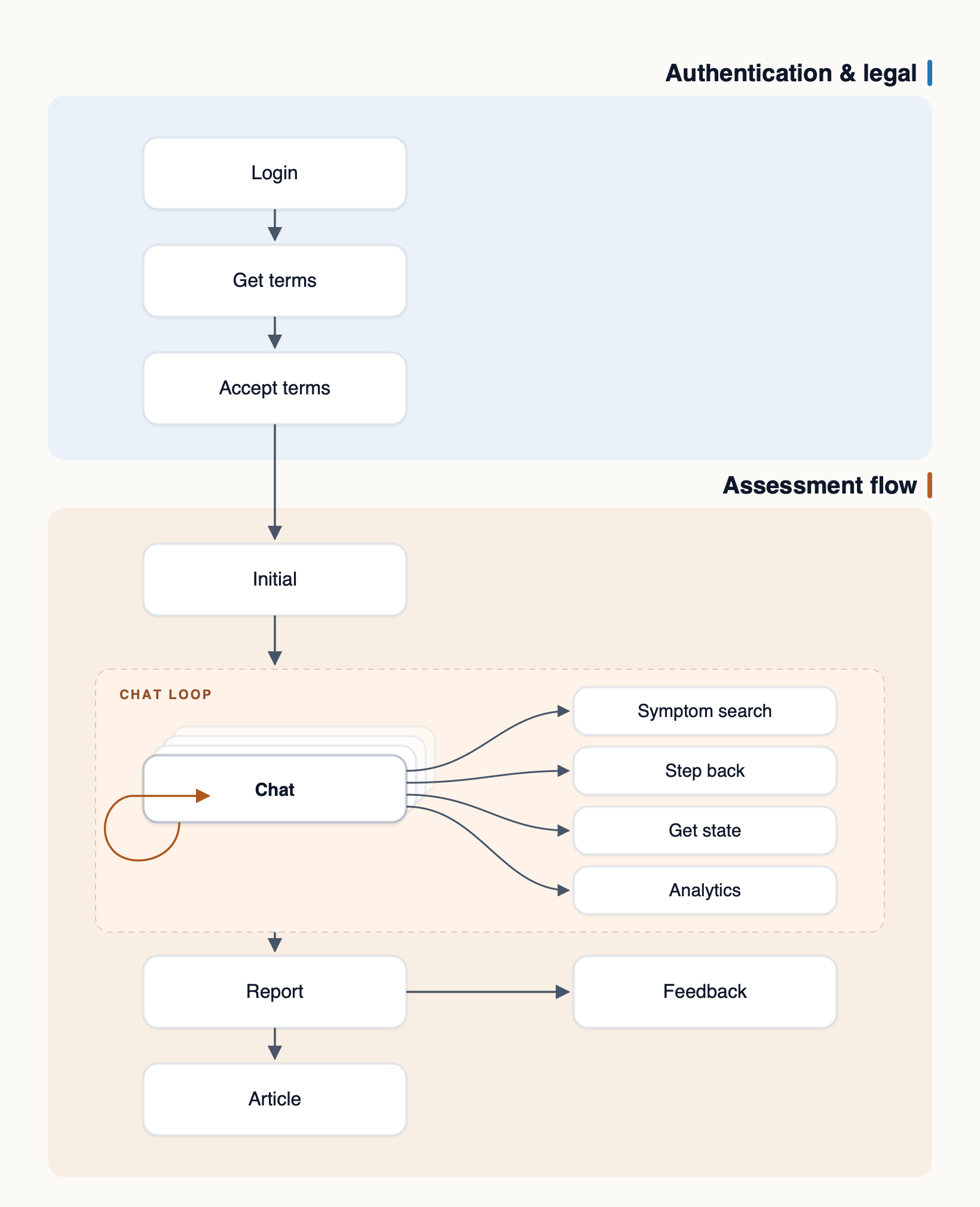
Here is a simplistic representation of how the entire flow might look, ending in a consultation report:
Phase by phase
Phase 0 — Login and consent
Covered in Authentication and Legal & Consent. Ends with an upgraded token and API-provided copy for the onboarding screen.
Phase 1 — Onboarding: POST /initial
POST /initialYou collect three things (using the onboarding_response questions for copy and constraints) and submit them together:
{
  "gender": "male",
  "age": 31,
  "initial_query": "earache, jaw clicks"
}
Constraints enforced by the API: age 18–125, initial_query 3–500 characters. The free-text query is spellchecked and interpreted by the medical NLU. The response is a normal chat response containing the first question.
Phase 2 — Symptom ratification
The engine extracts symptoms it recognised from the free text and asks the user to confirm them — a generic multi-select question (min_selections: 0) whose choices are the recognised symptoms plus closely related ones. The user's included/excluded selections seed the whole assessment.
Branching at this point:
-
Symptoms confirmed → proceeds to clarification/duration.
-
Nothing recognised, or user selects none → the flow falls back to autocomplete: an
autocompletequestion where the user searches for their symptom. If the user confirms none, send the answer — the API responds with theautocompletequestion; don't navigate on the client:{ "type": "generic", "included": [], "excluded": ["<all choice ids>"] }For the
autocompletequestion, drive your search box withGET /symptom-search?text=...as the user types, then answer with the chosen suggestion'sid(e.g.assessment_C2316035):{ "type": "autocomplete", "included": ["assessment_C2316035"] }If the user has nothing to add (or can't find their symptom), skip the step by sending the literal id
skip_autocompleteinincluded. The number of suggestions that may be sent at once is governed by the question'sconstraints. -
Still nothing found → the engine reports that no symptom was matched and offers a restart; there may be no diagnostic report (see edge outcomes).
-
Informational intent (the user asked a general health question rather than describing symptoms) → the flow may short-circuit to an information report with articles instead of a consultation.
After ratification the user may be offered a separate generic question to continue the assessment or add more symptoms — render it as an ordinary choice; the ids are in the question payload.
Phase 3 — Clarification
If a confirmed symptom is ambiguous (e.g. "weakness" — muscular? general fatigue?), the engine asks one or more clarify questions: generic questions with alphanumeric choice ids (e.g. A290201), single- or multi-select — follow constraints. Answer them like any other question; several may occur in a row. Choosing none leads to the next clarification question or to duration, not to autocomplete.
Phase 4 — Duration
A generic single-choice question asking how long the user has had the symptoms; choice ids are duration buckets (hour, day, week, month, year).
Phase 5 — Health background
A health_background multi-choice question listing pre-existing conditions and risk factors (choice ids are CUIs). Users commonly select none — send all choice ids in excluded:
{
  "type": "health_background",
  "included": [],
  "excluded": ["C0011849", "C0004096", "C0010054"]
}
Phase 6 — Diagnostic questions
The main consultation: the diagnostic engine asks a dynamic series of questions, each chosen based on the answers so far. Expect a mix of question types — symptom (single yes/no-style conditionality), symptoms (multi-select), symptoms_choose_one, and factor (influencing factors like recent injury or medication). The number of questions varies per case; the progress object is your only reliable signal of how far along the user is.
Red-flag ("rule out") questions appear here too — they look like normal questions but drive the urgent/emergency triage outcomes.
Phase 7 — Report
When report_possible is true and the flow yields no further question, call GET /report. The response contains the full structured report (Reports) and conversation_details.conversation_ended will be true: the consultation is finished, and a new one requires a new login.
Progress
"progress": { "stage": "Symptoms Assessment", "percentage": 30 }percentage(0–100) drives a progress bar. It is monotonically increasing in normal flow but is an estimate — the number of remaining questions is dynamic, so don't derive "N questions left" from it.stageis display-ready text for the current phase.
Step back
If conversation_details.step_back_possible is true, the user may undo the last answered question:
POST /api/v1/step-back (empty body)The response re-renders the previous question so the user can answer differently, and the abandoned answer is discarded. Notes:
- One step per call; step-back is not available at the very beginning of the conversation or after the report.
- Always gate your "Back" button on the flag from the latest response.
- After a step-back, continue as normal: the next
POST /chatanswers the re-rendered question.
Re-rendering the current state: GET /chat
GET /chatGET /api/v1/chat returns the current question without advancing state — use it to restore the UI after a page refresh, app resume, or navigation, instead of keeping your own copy of the last response. It is also the only call that still works after conversation_ended (returning the final state).
Sequencing rules (important)
- The conversation is strictly sequential per token: answer the question you were last shown. There is no parallelism and no answering out of order.
- The
typeyou send inPOST /chatmust be thetypeof the question you are answering (the server validates answers against the current question's allowed choices and constraints — violations return400). - Don't retry a
POST /chatblindly on timeout: the answer may have been applied. Recover withGET /chatto see the authoritative current question, then continue from there.
Updated 3 days ago