
Reports
The final report structure - triage levels, conditions, care recommendations, and edge-case outcomes
GET /report (allowed once conversation_details.report_possible is true) returns the consultation outcome:
{
  "conversation_details": {
    "step_back_possible": false,
    "report_possible": false,
    "scenario": "consultation_report",
    "conversation_ended": true,
    "symptoms_summary": {},
    "progress": { "stage": "Report", "percentage": 100 }
  },
  "report": { ... }
}
The report object is a patient-facing, presentation-ready structure: the API has already turned the diagnostic engine's output into display messages, ordered sections, colours, and calls-to-action. Your job is to render it faithfully — especially triage levels and disclaimers.
Report structure overview
report
├── overall_outcome          ← headline: triage level, recommendation, action
├── subdomains_container     ← possible causes, grouped by category
├── other_options            ← alternative care options (cards with actions)
├── summary                  ← what the user told us (age, symptoms, answers)
├── disclaimer_messages      ← legal/medical disclaimers (must render)
└── information_articles     ← related articles (edge-case outcomes only)
overall_outcome — the headline
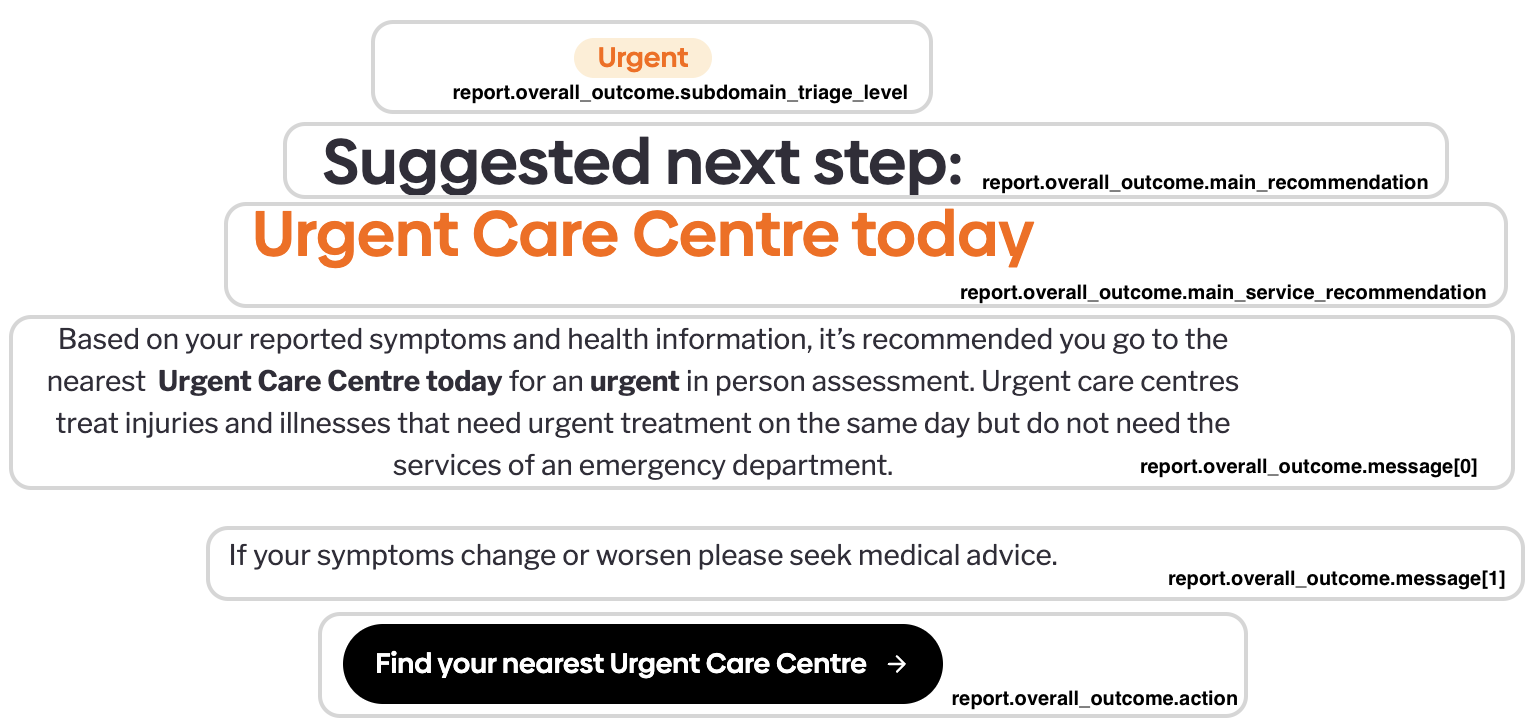
overall_outcome — the headline{
"subdomain_triage_level": {
"display_name": "Emergency",
"triage_level_color": "RED"
},
"main_recommendation": "Suggested next step:",
"main_service_recommendation": "Emergency Department",
"messages": [
{
"value": "Based on your reported symptoms and health information, it’s recommended you/they go to your nearest **emergency department immediately**. …",
"type": "PARAGRAPH",
"format": "MARKDOWN"
},
{
"value": "If your symptoms change or worsen please seek medical advice.",
"type": "PARAGRAPH",
"format": "MARKDOWN"
}
],
"action": {
"label": "Find your nearest emergency department",
"type": "URL",
"value": "https://www.nhs.uk/nhs-services/urgent-and-emergency-care-services/find-urgent-and-emergency-care-services/"
},
"instructions": []
}| Field | Render as |
|---|---|
subdomain_triage_level.display_name | The urgency headline (e.g. "Emergency", "Urgent", "Non-urgent", "Self-care") |
subdomain_triage_level.triage_level_color | Colour-code the headline: RED, AMBER, BLUE, GREEN, BLACK, NONE |
main_recommendation | The primary advice sentence |
main_service_recommendation | The recommended care service (e.g. "General Practitioner", "Pharmacy") |
messages / instructions | Supporting copy — render in order |
action | A call-to-action button; see below |
instructionsis empty ([]) in a normal consultation report. It's only populated in edge-case outcomes — when no outcome could be reached or the input couldn't be understood (see Edge-case outcomes).
The Action object
Action objectEvery call-to-action button in a report — the action here in overall_outcome and the one on each other_options card — is the same Action object:
{ "label": "Call 999", "type": "PHONE_NUMBER", "value": "tel:999" }| Field | Description |
|---|---|
label | The button text, display-ready (e.g. "Call 999", "Find your nearest emergency department"). |
type | What kind of action — determines how to interpret value (below). |
value | The action target; its meaning depends on type. Omitted entirely for RESTART. |
type | value looks like | What the button should do |
|---|---|---|
PHONE_NUMBER | A tel: URI, e.g. tel:999 | Start a phone call |
EMAIL | An email address | Open an email draft (mailto:) |
URL | An http(s) link | Open the link |
RESTART | (absent) | Offer to begin a new assessment |
The RESTART action (typical label: "Restart assessment") is the one type with no target: the value field is missing from the JSON — it's a signal, not a link. It's up to you to decide where the button takes the user (e.g. your symptom-checker entry screen). Wherever that is, a new assessment always starts from a fresh POST /login.
Triage levels
The underlying urgency scale, from most to least urgent:
| Level | Typical display | Colour |
|---|---|---|
emergency_ambulance, emergency_ae | Emergency | RED |
urgent_12h, urgent_48h | Urgent | AMBER |
routine | Non-urgent | BLUE |
self_care, self_limiting | Self-care | GREEN |
workaround, no_outcome | No outcome / Information | BLACK |
You normally consume the pre-rendered display_name + triage_level_colorrather than the raw enum. Never downgrade, hide, or re-order urgency: emergency outcomes must be the first and most prominent thing the user sees.
subdomains_container — possible causes
subdomains_container — possible causesConditions are grouped into categories, each category into subdomains (symptom areas), each subdomain into concrete conditions:
{
  "messages": [
    { "value": "Why this recommendation", "type": "HEADER", "format": "PLAIN_TEXT" },
    { "value": "It’s recommended you go to the **emergency department** because the possible cause(s) of your reported symptoms may need **immediate** medical attention", "type": "PARAGRAPH", "format": "MARKDOWN" },
    { "value": "In the section “Something needs ruling out” you can choose possible cause(s) that may need to be looked into …", "type": "PARAGRAPH", "format": "MARKDOWN" },
    { "value": "How urgently you need to be seen has taken into account the following important health information you provided:", "type": "PARAGRAPH", "format": "MARKDOWN" },
    { "value": "**Symptom(s):** Headache, Sudden change in vision, Slurred speech, Change in vision in one eye only", "type": "BULLET_POINT", "format": "MARKDOWN" },
    { "value": "Influenced by the **duration** of your symptoms", "type": "BULLET_POINT", "format": "MARKDOWN" }
  ],
  "subdomains_categories": [
    {
      "messages": [
        { "value": "Something needs ruling out", "type": "HEADER", "format": "PLAIN_TEXT" }
      ],
      "subdomain_type": "TO_RULE_OUT",
      "subdomain_category_color": "RED",
      "subdomains": [
        {
          "label": "Needs ruling out",
          "cui": "CM001929",
          "name": "Stroke-like disorder(s)",
          "subdomain_triage_level": { "display_name": "Emergency", "triage_level_color": "RED" },
          "primary_service": "Emergency Department",
          "trigger_details": [
            { "value": "Headache", "type": "BULLET_POINT", "format": "PLAIN_TEXT" },
            { "value": "Sudden change in vision", "type": "BULLET_POINT", "format": "PLAIN_TEXT" },
            { "value": "Slurred speech", "type": "BULLET_POINT", "format": "PLAIN_TEXT" },
            { "value": "Change in vision in one eye only", "type": "BULLET_POINT", "format": "PLAIN_TEXT" },
            { "value": "Influenced by the **duration** of your symptoms", "type": "BULLET_POINT", "format": "MARKDOWN" }
          ],
          "conditions": [
            {
              "cui": "C0018946",
              "name": "Subdural haemorrhage",
              "level": { "display_name": "Emergency", "triage_level_color": "RED" },
              "primary_service": "Emergency Department",
              "trigger_details": [
                { "value": "Headache", "type": "BULLET_POINT", "format": "PLAIN_TEXT" },
                { "value": "Slurred speech", "type": "BULLET_POINT", "format": "PLAIN_TEXT" },
                { "value": "Influenced by the **duration** of your symptoms", "type": "BULLET_POINT", "format": "MARKDOWN" }
              ],
              "article": {
                "name": "Subdural hematoma – the facts you need",
                "content": {
                  "name": "Subdural hematoma – the facts you need",
                  "medical_name": "Subdural haematoma",
                  "snippet": "Subdural haemorrhage is when blood collects between the surface of the brain and the skull.",
                  "triage_messages": [
                    {
                      "messages": [
                        { "value": "How is it diagnosed?", "type": "HEADER", "format": "PLAIN_TEXT" },
                        { "value": "Your doctor might suspect subdural haemorrhage based on your symptoms and a physical examination. \n\nYou may need tests including:\n\n- blood tests\n- CT or MRI scan", "type": "PARAGRAPH", "format": "MARKDOWN" }
                      ]
                    },
                    {
                      "messages": [
                        { "value": "Treatment", "type": "HEADER", "format": "PLAIN_TEXT" },
                        { "value": "**How can I manage it?**\n\nSubdural haemorrhage is a potentially life-threatening condition that needs emergency medical attention. …", "type": "PARAGRAPH", "format": "MARKDOWN" }
                      ]
                    },
                    {
                      "messages": [
                        { "value": "When to take action", "type": "HEADER", "format": "PLAIN_TEXT" },
                        { "value": "Call an ambulance immediately if you have (or someone else has) the following symptoms:\n\n- numbness or weakness of your face, arm or leg\n- …", "type": "PARAGRAPH", "format": "MARKDOWN" }
                      ]
                    }
                  ]
                },
                "information_article": {
                  "id": "subdural-haematoma",
                  "name": "Subdural hematoma – the facts you need",
                  "snippet": "Subdural haemorrhage is when blood collects between the surface of the brain and the skull.",
                  "image": "https://images.ctfassets.net/…/subdural-haematoma-male-card.jpg",
                  "reading_time_minutes": 5
                }
              },
              "superdomain_cui": "CM001978",
              "superdomain_name": "Emergencies, injury and poisoning"
            },
            { "cui": "C0149793", "name": "Amaurosis fugax", ... },
            { "cui": "C0154841", "name": "Central retinal vein occlusion", ... }
          ]
        }
      ]
    }
  ]
}subdomain_type∈TO_RULE_OUT|LIKELY|ALSO_CONSIDERED.TO_RULE_OUTis the safety-critical category — conditions the user should actively exclude with a professional; render it above/ahead of "likely".- Each condition may include an
articlewith a snippet, next-stepstriage_messages, and aninformation_articlecard whoseidcan be passed toGET /articlesfor the full content. - The API does not expose numeric probabilities — the ordering and category grouping is the ranking. Preserve the given order.
Here's how the report.subdomains_container should be rendered:
Below, see the how a response with a single subdomain should be rendered.
The information icon should be clickable and should expose the conditions array of each subdomain.
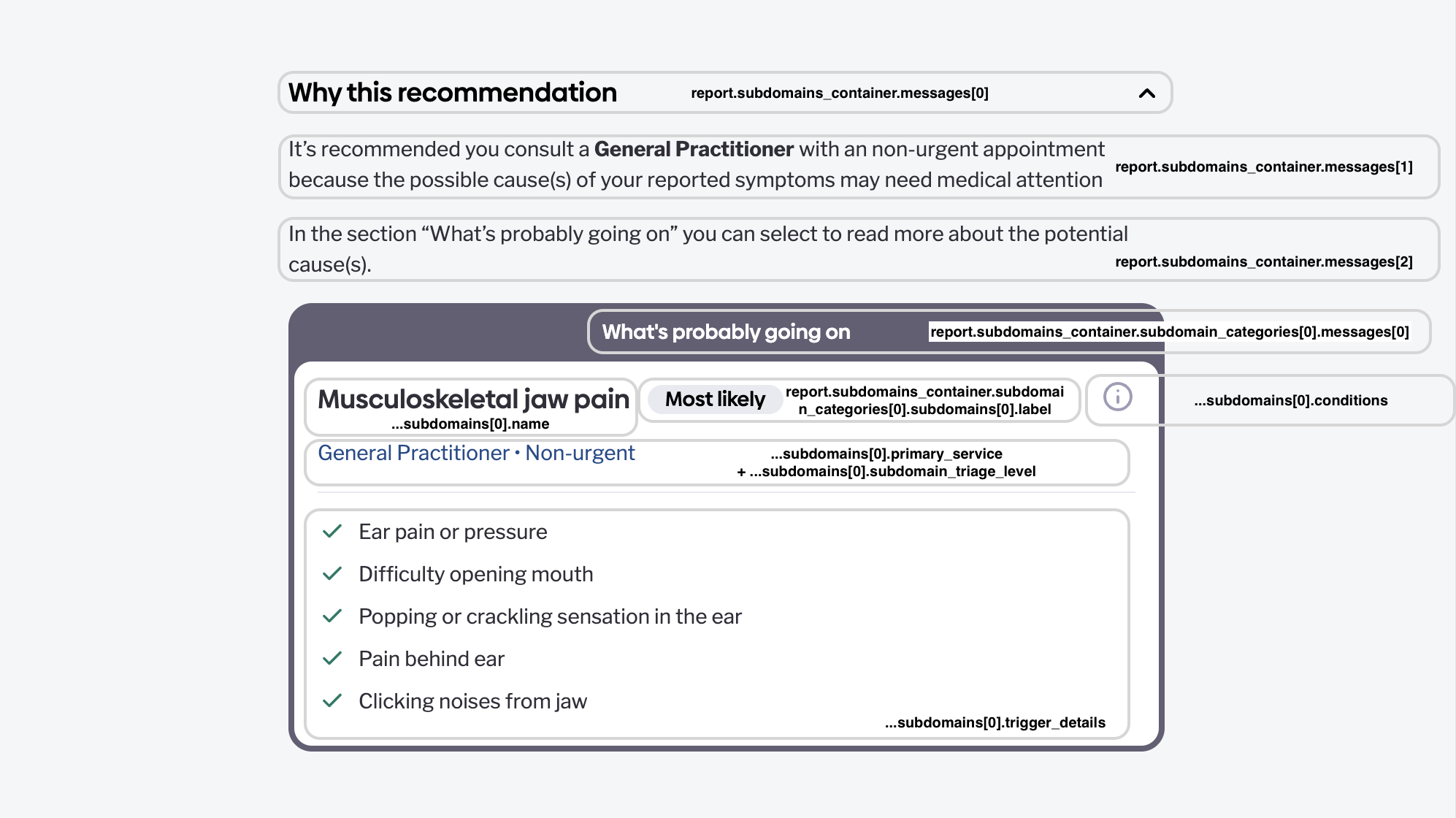
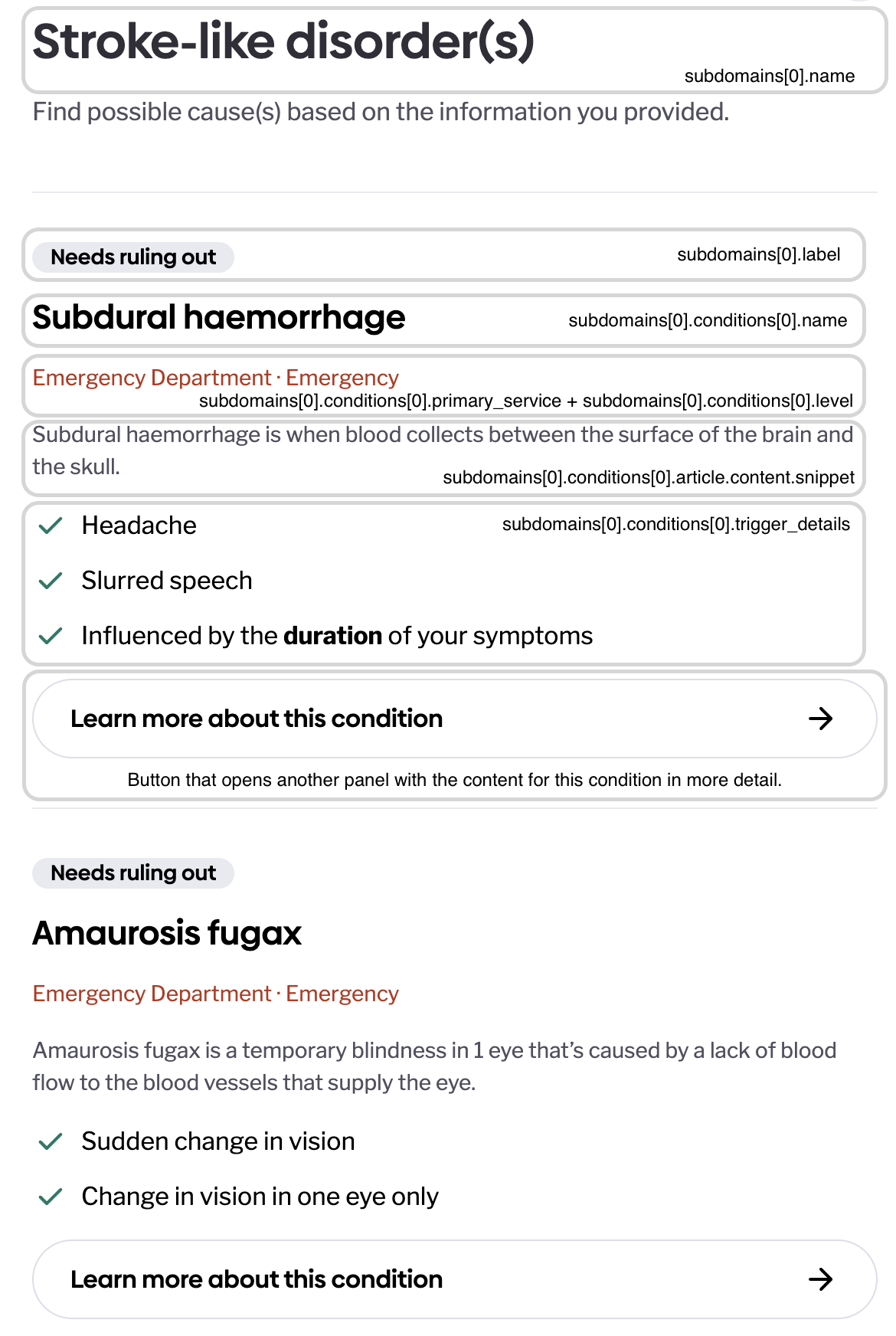
Here's how the popup should look when the subdomain has multiple conditions:
First screen:
When clicking on Learn more about this condition, the following pop up is displayed. If the subdomain has a single condition, you can skip the first screen and show this directly:
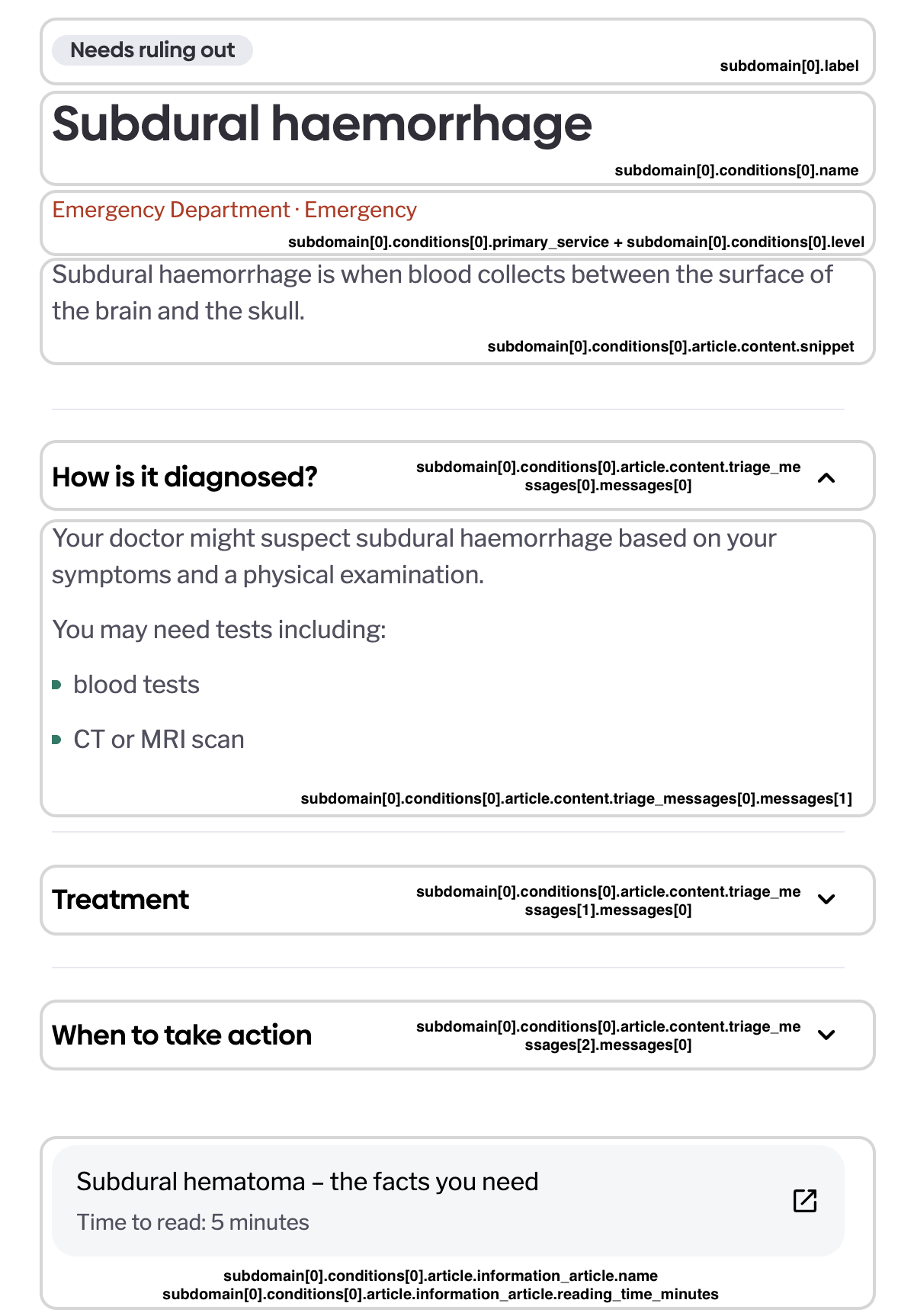
When clicking on the article button, a /GET article request should be made using the information_article.id to get the full content. That should be also rendered in a pop up.
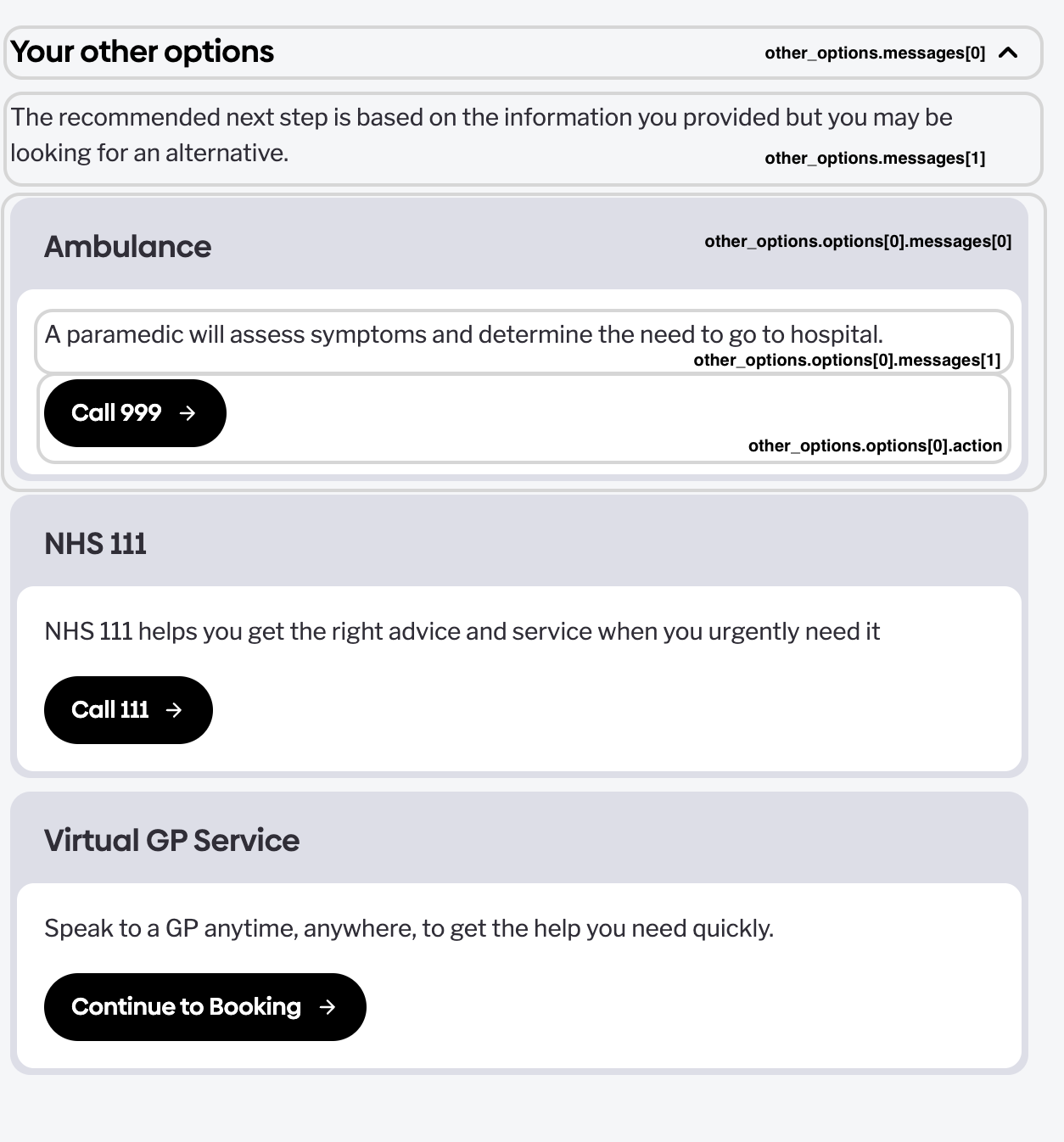
other_options
other_optionsAlternative care options rendered as cards — each card pairs messages with an Action button:
{
  "messages": [
    { "value": "Your other options", "type": "HEADER", "format": "PLAIN_TEXT" },
    { "value": "The recommended next step is based on the information you provided but you may be looking for an alternative.", "type": "HEADER", "format": "PLAIN_TEXT" }
  ],
  "options": [
    {
      "messages": [
        { "value": "Ambulance", "type": "HEADER", "format": "PLAIN_TEXT" },
        { "value": "A paramedic will assess symptoms and determine the need to go to hospital.", "type": "PARAGRAPH", "format": "PLAIN_TEXT" }
      ],
      "action": { "label": "Call 999", "type": "PHONE_NUMBER", "value": "tel:999" }
    },
    {
      "messages": [
        { "value": "NHS 111", "type": "HEADER", "format": "PLAIN_TEXT" },
        { "value": "NHS 111 helps you get the right advice and service when you urgently need it", "type": "PARAGRAPH", "format": "PLAIN_TEXT" }
      ],
      "action": { "label": "Call 111", "type": "PHONE_NUMBER", "value": "tel:111" }
    },
    {
      "messages": [
        { "value": "Virtual GP Service", "type": "HEADER", "format": "PLAIN_TEXT" },
        { "value": "Speak to a GP anytime, anywhere, to get the help you need quickly.", "type": "PARAGRAPH", "format": "PLAIN_TEXT" }
      ],
      "action": { "label": "Continue to Booking", "type": "URL", "value": "https://doctorcareanywhere.com/" }
    }
  ]
}
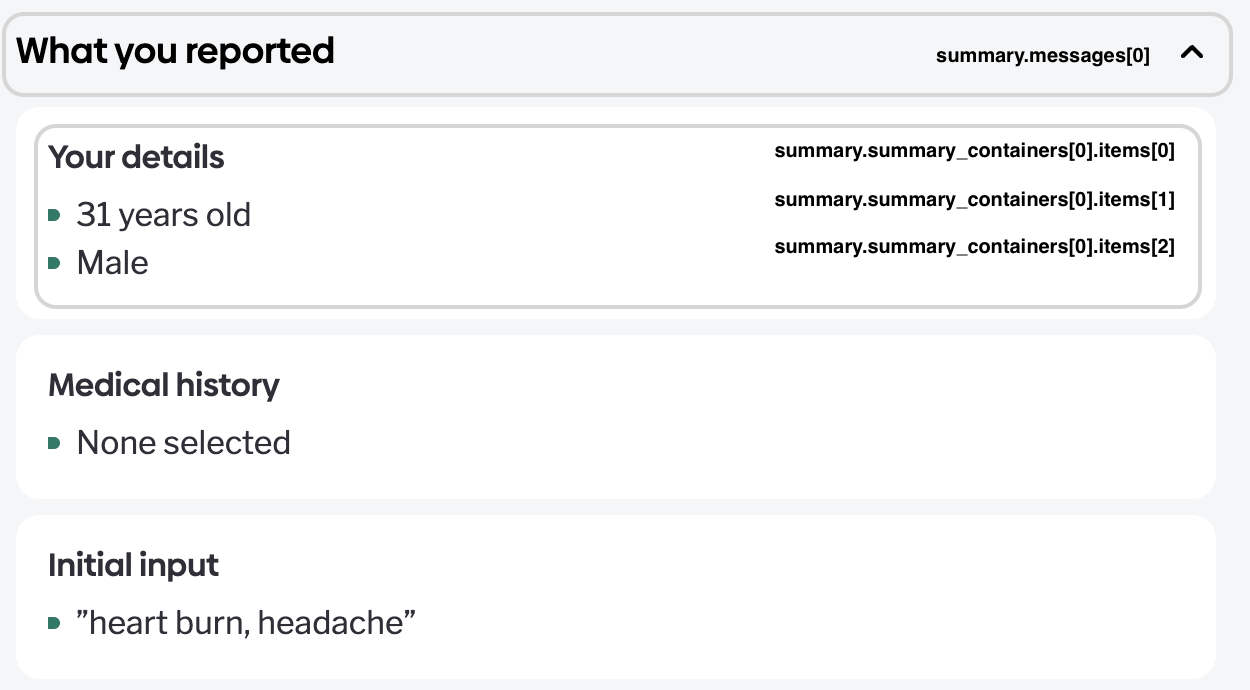
summary — what the user reported
summary — what the user reportedPre-formatted recap of the consultation input (age, gender, duration, included and excluded symptoms), as display messages grouped into containers:
{
  "messages": [
    { "value": "What you reported", "type": "HEADER", "format": "PLAIN_TEXT" },
    { "value": "Below you can see a detailed summary of your information including your personal details, medical history, present symptoms, absent symptoms and unsure symptoms.", "type": "PARAGRAPH", "format": "PLAIN_TEXT" }
  ],
  "summary_containers": [
    { "items": [
      { "value": "Your details", "type": "HEADER", "format": "PLAIN_TEXT" },
      { "value": "31 years old", "type": "BULLET_POINT", "format": "PLAIN_TEXT" },
      { "value": "Male", "type": "BULLET_POINT", "format": "PLAIN_TEXT" }
    ] },
    { "items": [
      { "value": "Medical history", "type": "HEADER", "format": "PLAIN_TEXT" },
      { "value": "None selected", "type": "BULLET_POINT", "format": "PLAIN_TEXT" }
    ] },
    { "items": [
      { "value": "Initial input", "type": "HEADER", "format": "PLAIN_TEXT" },
      { "value": "”heart burn, headache”", "type": "BULLET_POINT", "format": "PLAIN_TEXT" }
    ] },
    { "items": [
      { "value": "Confirmed symptoms", "type": "HEADER", "format": "PLAIN_TEXT" },
      { "value": "Headache", "type": "BULLET_POINT", "format": "PLAIN_TEXT" },
      { "value": "Burning pain in chest", "type": "BULLET_POINT", "format": "PLAIN_TEXT" }
    ] },
    { "items": [
      { "value": "Duration of symptoms", "type": "HEADER", "format": "PLAIN_TEXT" },
      { "value": "4 - 12 weeks", "type": "BULLET_POINT", "format": "PLAIN_TEXT" }
    ] },
    { "items": [
      { "value": "Reported as present", "type": "HEADER", "format": "PLAIN_TEXT" },
      { "value": "Headache on waking up", "type": "BULLET_POINT", "format": "PLAIN_TEXT" },
      { "value": "Slurred speech", "type": "BULLET_POINT", "format": "PLAIN_TEXT" },
      { "value": "Sudden change in vision", "type": "BULLET_POINT", "format": "PLAIN_TEXT" },
      ...
    ] },
    { "items": [
      { "value": "Reported as absent", "type": "HEADER", "format": "PLAIN_TEXT" },
      { "value": "Pause(s) in breathing", "type": "BULLET_POINT", "format": "PLAIN_TEXT" },
      { "value": "Pain at the back of the head", "type": "BULLET_POINT", "format": "PLAIN_TEXT" },
      ...
    ] }
  ]
}
Useful for a "review your answers" section and for the user to sanity-check what the assessment was based on.
disclaimer_messages
disclaimer_messagesA list of Message objects with the legal/medical disclaimers for the report ("this is not a diagnosis", etc.). Rendering these with the report is mandatory — do not truncate or hide them.
[
  {
    "value": "Please note: This isn’t a diagnosis. Find out ['How to use Healthily safely'](https://www.healthily.ai/legal-pages/how-to-use-healthily-safely). Always seek medical advice if you’re unsure, or if your symptoms get worse, or don’t improve. Healthily is not liable for any decisions, acts or omissions you make. If you think it’s serious or an emergency, don't delay to seek medical attention.",
    "type": "PARAGRAPH",
    "format": "MARKDOWN"
  }
]
information_articles
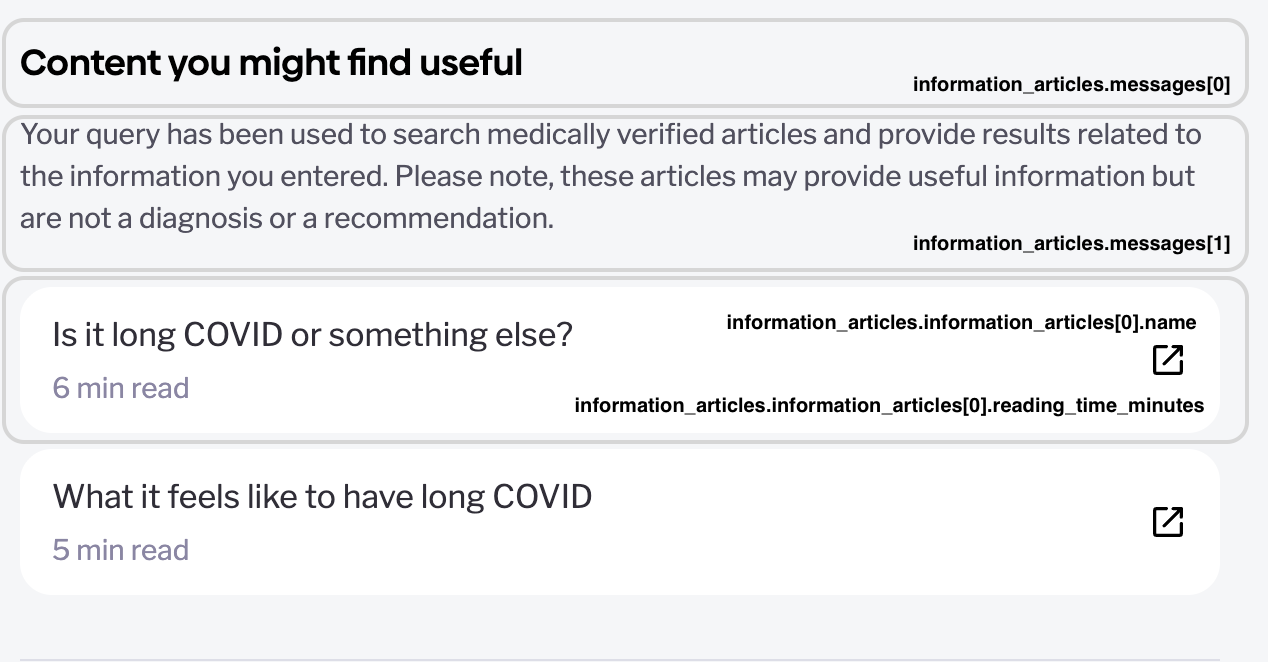
information_articlesRelated reading, as lightweight cards. This section is not part of a standard consultation report (the emergency example above doesn't have one) — it only appears in the edge-case outcomes below, namely information reports and single-symptom / workaround outcomes, where articles stand in for a ranked condition list:
{
  "messages": [ { "value": "Related articles", "type": "HEADER", "format": "PLAIN_TEXT" } ],
  "information_articles": [
    { "id": "con-earache", "name": "Earache", "snippet": "...",
      "image": "https://...", "reading_time_minutes": 4 }
  ]
}
Fetch full article bodies with GET /articles?ids=... (max 20 per call) or GET /article/{id}.
Edge-case outcomes
Not every consultation ends with a ranked condition list. Your UI must handle all of these:
| Outcome | What you'll see | What to render |
|---|---|---|
| Information report | overall_outcome with an information-style triage (display_name like "Information", colour BLACK) and information_articles; no/empty condition categories | The messages + article cards; this happens when the user's intent was informational rather than symptomatic |
| Assessment not possible | Outcome messages explaining the assessment couldn't be completed, often with a RESTART action | The explanation + restart CTA (new login required) |
| No cause found | Symptoms were understood but no condition matched | Outcome messages + any articles; advise professional consultation per the provided copy |
| Single symptom / highly non-pathological | A "workaround" outcome: general advice + articles instead of a differential | Messages + articles as given |
The uniform rule: render whatever sections are present, in the order given, and rely on messages for the explanation — the API always sends display-ready copy for these states.
After the report
conversation_ended is true. GET /chat (and GET /report) still return the final state, but no further answers are accepted. A new assessment — e.g. via a RESTART action — starts from POST /login again.
Updated 3 months ago